Bank-Grade Security
AES-256 encryption at rest and TLS 1.3 encryption in transit.
Liqvia brings together your cash position, 13-week forecast, obligations, AI insights and financial decisions into one explainable workspace—so you can act before cash becomes a problem.
Every forecast. Every recommendation. Every alert.
Fully transparent. Fully explainable. Never a black box.
No credit card required. Demo companies included.
Or try a sample business closer to your own:
Trusted by finance teams in private beta
Current Cash
$247,800
Cash Runway
18 weeks
At current burn rate
Liquidity Health
Healthy
Weekly Burn
$12,300
Payroll
Due soon$42,000
Due Jul 25
Critical priority
GST
Scheduled$18,400
Due Aug 1
Tax priority
Rent
Due soon$9,200
Due Jul 21
Critical priority
Suppliers
Scheduled$8,200
Due Jul 28
Flexible priority
Loan
Funded$6,100
Due Jul 30
Critical priority
Consolidated balances across operating and reserve accounts, updated from your uploads.
See how many weeks of liquidity remain at your current burn rate.
Get notified when runway tightens or payables threaten your cash position.
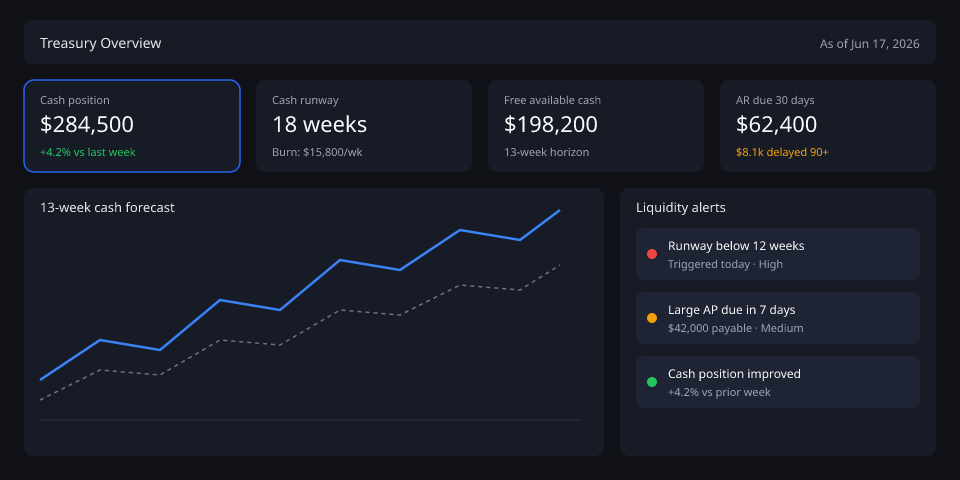
Your live treasury dashboard — alerts, runway, and forecasts in one view.
Trust & Security
Protecting sensitive financial data with the controls and governance expected by modern finance organizations.
AES-256 encryption at rest and TLS 1.3 encryption in transit.
Role-based permissions across companies, entities and team members.
Every financial action is logged, traceable and reviewable.
Keep financial data aligned with regional compliance requirements.
Liqvia was designed by finance and audit professionals who experienced first-hand the limitations of spreadsheet-based cash management.
Finance & Audit Expertise
Treasury Best Practices
IFRS Compatible
GAAP Compatible
13-Week Cash Flow Methodology
Audit-Friendly Reporting
Forecast methodology
Liqvia builds your forecast from the same AR, AP, bank, and weekly actual data your finance team already maintains. Every rule is documented, testable, and visible in the app.
Step 1
Each upload refreshes a rolling weekly cash model tied to your company’s opening balance.
Step 2
Assumptions follow standard SME treasury practice and match what you see in the product.
Step 3
We focus on explainability and continuous improvement — not opaque accuracy claims.
Scenario modelling
Stress-test your baseline forecast with sliders — no spreadsheet rebuild. Start from real SME questions, then see week-13 cash and runway side by side.
What if revenue drops 20%?
Liqvia reduces expected receivable collections by 20% and recalculates your 13-week closing cash and runway.
In Scenarios: apply “Revenue drops 20%” or fine-tune the sliders yourself.
What if customer payments slow by 15 days?
Liqvia shifts receivable collection dates 15 days later, showing the cash gap before collections land.
In Scenarios: apply “Payments slow 15 days” or fine-tune the sliders yourself.
What if we hire 3 people?
Model hiring as a payroll cost increase — e.g. +12% payroll on your current team — and see how many weeks of cash remain.
In Scenarios: apply “Hire 3 people (~12% payroll)” or fine-tune the sliders yourself.